You can find the tasks.json file below to build these solutions separately.
You can run the task by
- pressing CTRL+SHIFT+P
- selecting Run Task
- choosing the appropriate option
Unable to locate SecretManager >= 1.0.0-beta4-10173There is an easy fix: you can remove the last part of the version identifier.
"dependencies": {Files to be changed:
"SecretManager": "1.0.0-beta4-*"
},
| Package path: | %UserProfile%\.dnx\packages\SecretManager\1.0.0-beta4\app\project.json |
| Cache path: | %UserProfile%\.dnx\bin\packages\SecretManager\1.0.0-beta4\app\project.json |
Type 'System.String[]' with data contract name 'ArrayOfstring:http://schemas.microsoft.com/2003/10/Serialization/Arrays' is not expected. Consider using a DataContractResolver or add any types not known statically to the list of known types - for example, by using the KnownTypeAttribute attribute or by adding them to the list of known types passed to DataContractSerializer.It seems RouteValueDictionary cannot manage IEnumerable or String[] as a parameter. The solution is simple, it's a well-known issue:
http://stackoverflow.com/questions/19960420/adding-array-of-complex-types-to-routevaluedictionary
Html.RenderAction(ActionName,
ControllerName,new RouteValueDictionary(new{ usual properties here }));
Partial apply by Wikipedia:
In computer science, partial application (or partial function application) refers to the process of fixing a number of arguments to a function, producing another function of smaller arity. Given a function
, we might fix (or 'bind') the first argument, producing a function of type
. Evaluation of this function might be represented as
. Note that the result of partial function application in this case is a function that takes two arguments.
In short, that means you define (bind) some of the possible arguments and leave some to be filled in later (free).
def sum(a:Int, b:Int, c:Int):Int = a+b+c  //> sum: (a: Int, b: Int, c: Int)Int
sum(1,2,3)                                //> res11: Int = 6

def sum1 = sum(1, _:Int, _:Int)           //> sum1: => (Int, Int) => Int
sum1(2,3)                                 //> res12: Int = 6

def sum2 = sum(_:Int, 2, _:Int)           //> sum2: => (Int, Int) => Int
sum2(1,3)                                 //> res13: Int = 6
sum1 binds the first parameter but the other two parameters are free. As you can see from the result it gets translated to a lambda with two parameters.
sum2 binds the second parameter. The result is the same, a lambda with two parameters.
C# has no built-in operator for applying a function, so we have to write the lambdas directly.
readonly Funcsum = (x, y, z) => x + y + z; [Fact] public void Sum() { var result = sum(1, 2, 3); Assert.Equal(6, result); } [Fact] public void Sum_PartialApply_FirstParam() { Func sum1 = (y, z) => sum(1, y, z); var result = sum1(2, 3); Assert.Equal(6, result); } [Fact] public void Sum_PartialApply_SecondParam() { Func sum2 = (x, z) => sum(x, 2, z); var result = sum2(1, 3); Assert.Equal(6, result); }
There is a pattern is Scala called loan pattern. You open a resource, “loan” the resource to another function, and the loaner closes the resource.
This function expects a file a function. When it's called it creates the resource, executes the function and closes the resource.
def withPrintWriter(file: File, op: PrintWriter => Unit) {
  val writer = new PrintWriter(file)
  try {
    op(writer)
  } finally {
    writer.close()
  }
}
This is how it's called:
withPrintWriter(
  new File("date.txt"),
  writer => writer.println(new java.util.Date)
)
Now I extended the definition with currying:
readonly Func, string>> openFile =
    path =>
        handler =>
            {
                var reader = new StreamReader(path);
                try
                {
                    return handler(reader);
                }
                finally
                {
                    reader.Close();
                    Console.WriteLine("Stream closed");
                }
            };
Here are two examples on calling the function above:
readonly FuncreadAllLines = input => input.ReadToEnd(); readonly Func readSingleLine = input => input.ReadLine(); [Fact] public void LoanPattern_AllText() { var result = openFile("TextFile1.txt")(readAllLines); Assert.Equal("This is the test content.\r\nThis is a second line.", result); } [Fact] public void LoanPattern_ReadSingleLine() { var result = openFile("TextFile1.txt")(readSingleLine); Assert.Equal("This is the test content.", result); }
Now the code calling the function (openFile) is much simpler and there is no need for error handling in the caller. Furthermore thanks to currying, even the resource name can be bound in the constructor, hiding the resource initialization as well.
Currying is an interesting and powerful functional programming concept. Interestingly currying can be used in C# as well.
Let's define a simple add function that sums two numbers in C#:
[Fact]
public void SimpleAdd_AsInlineFunction_WithLambda()
{
    Func<int, int, int> add = (x, y) => x + y;
    var result = add(5, 7);
    Assert.Equal(12, result);
}
The same in Scala:
def add(x:Int,y:Int) = x+y                      //> add: (x: Int, y: Int)Int
add(5,7)                                        //> res0: Int = 12
Or with lambda:
def add_lambda = (x:Int,y:Int) => x+y           //> add_lambda: => (Int, Int) => Int
add_lambda(5,7)                                 //> res1: Int = 12
Now Implement the same function in C#, but this time with currying:
[Fact]
public void CurryingAdd()
{
    Func<int, Func<int, int>> add = x => y => x + y;
    var result = add(5)(7);
    Assert.Equal(12, result);
}
In Scala:
def add_lambda_currying(x:Int) = (y:Int) => x+y //> add_lambda_currying: (x: Int)Int => Int
add_lambda_currying(5)(7)                       //> res2: Int = 12
With simplified Scala syntax:
def add_currying(x:Int)(y:Int): Int = x+y       //> add_currying: (x: Int)(y: Int)Int
add_currying(5)(7)                              //> res3: Int = 12
Now let’s suppose I want to bind the first parameter to a concrete value (bound) but I want to keep the second parameter unbounded (free).
This is the way in C#:
[Fact]
public void CurryingAdd_Add5()
{
    Func> add = x => y => x + y;
    var add5 = add(5);

    var result1 = add5(7);
    Assert.Equal(12, result1);

    var result2 = add5(122);
    Assert.Equal(127, result2);
}
The same idea in Scala:
def add5_lambda_currying = add_lambda_currying(5)  //> add5_lambda_currying: => Int => Int
add5_lambda_currying(7)                         //> res3: Int = 12

def add5_currying = add_currying(5) _           //> add5_currying: => Int => Int
add5_currying(7)                                //> res5: Int = 12
In case of the add5_currying example please notice the underscore (_) at the end of the expression. That means partial apply and indicates that I don’t want to bind the second parameter. There is no need for such indicator with lambda syntax.
| Function | Description | .NET |
|---|---|---|
| zip | Pairs iterables element by element:* x = [1, 2, 3] * y = [4, 5, 6] * zipped = zip(x, y) * zipped [(1, 4), (2, 5), (3, 6)] | Enumerable.Zipint[] numbers = { 1, 2, 3, 4 };
string[] words = { "one", "two", "three" };
var numbersAndWords =
numbers.Zip(words, (first, second) => first + " " + second);
foreach (var item in numbersAndWords)
Console.WriteLine(item);
// 1 one
// 2 two
// 3 three
|
| reduce | Apply function of two arguments cumulatively to the items of iterable, from left to right, so as to reduce the iterable to a single value. For example, reduce(lambda x, y: x+y, [1, 2, 3, 4, 5])calculates ((((1+2)+3)+4)+5). | Enumerable.Aggregatestring sentence = "the quick brown fox jumps over the lazy dog";
// Split the string into individual words.
string[] words = sentence.Split(' ');
// Prepend each word to the beginning of the
// new sentence to reverse the word order.
string reversed = words.Aggregate((workingSentence, next) =>
next + " " + workingSentence);
// dog lazy the over jumps fox brown quick the
|
| filter | Construct a list from those elements of iterable for which function returns true.filter(lambda x: x%2, range(10)) result: 1 3 5 7 9 | Enumerable.WhereList |
[TestClass]
    public class UnitTest1
    {
        private static RunspaceConfiguration config;
        private static Runspace runspace;
        private static Pipeline pipe;
        private static Command command;

        [ClassInitialize]
        public static void TestFixtureSetup(TestContext context)
        {
            config = RunspaceConfiguration.Create();

            PSSnapInException warning;
            config.AddPSSnapIn("SnapinName", out warning);

            runspace = RunspaceFactory.CreateRunspace(config);
            runspace.Open();
        }

        [ClassCleanup]
        public static void TestFixtureTeardown()
        {
            runspace.Close();
        }

        [TestInitialize]
        public void Setup()
        {
            pipe = runspace.CreatePipeline();
            command = new Command("CommandName");
            pipe.Commands.Add(command);
        }

        [TestMethod]
        public void TestMethod1()
        {
            command.Parameters.Add(new CommandParameter("ParameterName", "Value"));

            var psObject = pipe.Invoke();
        }
    }
c:\Windows\Microsoft.NET\Framework64\v4.0.30319\InstallUtil.exe $(TargetPath)
c:\Windows\Microsoft.NET\Framework\v4.0.30319\InstallUtil.exe $(TargetPath)
public Stream GetResourceStreamByType(Type type, string resourceName)
{
  var location = Assembly.GetAssembly(type).Location;
  var assemblyBytes = File.ReadAllBytes(location);

  var appDomain = AppDomain.CreateDomain("Resource domain");
  var assembly = appDomain.Load(assemblyBytes);

  return assembly.GetManifestResourceStream(resourceName);
}

public BitmapImage GetBitmapByType(Type type, string resourceName)
{
  var bmp = new BitmapImage();
  using (var source = GetResourceStreamByType(type, resourceName))
  {
    bmp.BeginInit();
    bmp.StreamSource = source;
    bmp.EndInit();
  }

  return bmp;
}
I tried to use Ember.js Handlebars helper {{action}} in a Windows 8 Metro (Windows Store) application. The data marker attribute appeared, but the function was never called.
I managed to find the root cause: Ember.js uses jQuery.ready() for initialization.
Change
waitForDOMContentLoaded: function() {
    this.deferReadiness();

    var self = this;
    this.$().ready(function() {
      self.advanceReadiness();
    });
  },
to
waitForDOMContentLoaded: function() {
    this.deferReadiness();

    var self = this;

    WinJS.Application.addEventListener("ready", function () {
        self.advanceReadiness();
    });

  },
and comment out 2 lines as shown below: advanceReadiness: function() {
this._readinessDeferrals--;
//if (this._readinessDeferrals === 0) {
Ember.run.once(this, this.didBecomeReady);
//}
},
Now you will use the Metro infrastructure for events.
Handlebars uses script blocks for template markup. E.g.
<script type="text/x-handlebars" data-template-name="say-hello">
      Hello, <b>{{MyApp.name}}</b>
</script>
Unfortunately the Metro JavaScript engine removes the data-template-name attribute from the script tag, so this method can’t be used for templating.
As JS files are available locally for execution, the template files can be stored in separate HTML files and can be parsed from code. The implementation is simple:
Windows.ApplicationModel.Package.current.installedLocation.getFolderAsync(path).done(function(folder) {
    var search = folder.createFileQuery(Windows.Storage.Search.CommonFileQuery.orderByName);
                search.getFilesAsync().done(function (res) {
                        res.forEach(function (file) {
                                var template;
                                Windows.Storage.FileIO.readTextAsync(file).then(function(fileContent) {
                                       var template = Ember.Handlebars.compile(fileContent);
                                       Ember.TEMPLATES[file.displayName] = template;
[…]
I omitted the async promises from the code for readability, but the code won’t work without them.
The code above
Now Ember.js and Handlebars.js are fully functional, even Ember.View can be used with view.append().
I have some experience with a Samsung smart TV I will summarize here.
I have access to analog TV signal, and I must tell you this is not what a digital TV was made for. It’s acceptable, but
I tried to receive DVB-T signal but I couldn’t. Just a few channels with long breaks in receiving. Though the image quality was wonderful and I got EPG.
Teletext comes with the channels supporting this technology. It is the shadow of the analog era. Digital TVs try to enhance this technology:
Don’t expect too much from this.
Digital TVs support a standard protocol (DLNA) for receiving multimedia streams from other devices. Just put the two devices onto the same subnet of your LAN (use the same router with cable or Wi-Fi) and the two devices will see each other. In my case I run a Samsung AllShare DLNA server on my desktop computer and
Smartphones have the same capabilities. Moreover
You can by a NAS with DLNA support and you will have an always online media server without noisy fans.
Connecting a HDMI cable to the TV and the computer, means the computer’s desktop can be displayed on the TV, in excellent quality.
Even the sound can be redirected to the TV’s speakers or sound system. Just open the sound playback devices and set the TV as the default sound device.
If your TV supports HDMI Ethernet channel, you can use your TV as a(n Internet) router for multimedia device (blue-ray player etc.).
I have access to a Samsung smart TV. It has an Internet browser and apps can be downloaded from a store. There are some useful apps like online radio and TV channel guide, but the most useful app is the Internet browser. It has Flash support and loads most of the websites I tried to visit.
For better experience I suggest you to buy a wireless keyboard and mouse. There are multimedia keyboards combining these devices into a small device just like a game controller.
Require.js works with Windows 8 Metro-style (Windows Store) applications.
There is a JavaScript file for each HTML page files. You cannot wrap this .js file into a require function. The page events (e.g. the ready event) won’t be called.
You can place a require call into the event handler function and that works.
You can create a tag on the local branch and you must push the tag to the remote.
> git tag …
> git push --tags
Do you hate JavaScript? Well, I have bad news. There are still no alternatives in the web browsers.
I develop ASP.NET (MVC) –based web applications, and I must use JavaScript. What’s the big difference between the modern web applications and websites from a few years ago? Well, the server-side/client-side ratio. A few years ago I was happy coding on server-side. I did as much as I could do in C#, in ASP.NET. I did learn JavaScript but I avoided it as much as I could (so I never knew it well enough).
Now you can’t avoid JavaScript anymore. More and more code is on client-side. More and more business logic and architectural challenges are on client-side, right in the browser. I’ve written database-like features and even messaging systems in JavaScript. That challenge reminds me the early days of other languages. Missing features, missing language support, missing best practices, missing design patterns. Pure greenfield tasks.
How well do you speak JavaScript? A few years ago it was enough to understand how to define a function and some variables. Learn how DOM works. How different DOMs work. That’s not a small thing if you did it well. But did we write good, quality code with low bug ratio and good manageability? I’d say no.
A few years later there came the object-oriented world to JavaScript. We, I personally, had to learn the idea behind prototype-based languages. That’s a hard step with a ‘real’ object-oriented (Java, C#, C++) mindset. How can I implement inheritance? How can I hide data? How can I achieve polymorphism? Tough questions. Luckily along came design patterns. There are even a few books on the topic in JavaScript. Still, it’s not easy. I personally can recite 4-5 inheritance patterns. There are at least 2 data hiding patterns I can recall right now.
Well, many options, with their own drawbacks. It’s not easy to choose, e.g. at the beginning of a new project. There is no universal solution. There is no good solution. You have to consider the tasks you have to do with your object model and the knowledge level of the colleagues. Usually the later is harder. How much knowledge people have about JavaScript in e.g. Java/C# world? As much as they get along the projects. They teach each other. To good and bed. What I saw in the last years, mostly obsolete and sometimes bad. Not easy to show them the current trends and solutions. Or may I say, contemporary engineering practices. People can, and usually are, be very proud of their coding style, quality, cleverness, etc. How can they be so neglect on these in an other language, e.g. JavaScript?
Now there are frameworks for DOM manipulation (jQuery, dojo, YUI), for common tasks (Underscore, YUI, Closure), and there are architectural frameworks (Knockout, Backbone) as well. As you can see, they are fractured and you must use different frameworks for different tasks. You should choose well because it’s very very hard to change frameworks, and you have to watch out for compatibility. Framework version changes represent huge risk in the lifetime of a project. Even a minor version change can render your web application totally useless. So test heavily.
No we have two ways. Full manual testing with a lot of humans. Or follow the ‘new’ trend and use some kind of automated test frameworks (Selenium, Watir). If they work the way you think. If it’s not more time to maintain your tests than execute them manually.
The same applies to unit tests. There are various frameworks in different flavors (xUnit, BDD, etc.) with different capabilities and APIs. Some live long, some live short. Choose well. Update regularly. Follow the news, trends.
Well, I chose a unit testing framework. Now I should test my code. How? It produces HTML into the DOM and calculates things according to different business rules – in the same function. Well, good luck. Try separating your business logic from visual stuff. Rings the bell? MVC? MVVM? Well, I’d say Knockout and Backbone. I’d say use (revealing) module pattern for your view model and your rendering as well. Separate them. Use a framework, e.g. Require.js. If you do it good, you can even get rid of the inheritance and other OO problems. Now you can test your business logic separated from the UI.
Next problem: I have a dynamic AJAX (AJAJ - Asynchronous Javascript and JSON) application calling back to the server. That’s not good. Let’s spy. Let’s stub. Let’s mock. Find a framework, I chose Sinon.
So, let’s summarize. I do my job well if I know functions, variables, OO patterns, DOM frameworks, task frameworks, architectural frameworks, testing frameworks, module patterns, JavaScript mocking frameworks. Is that enough?
I have bed news. We in the web world develop applications like C++ coders develop applications for Windows, Linux, BSD… at the same time with the same code base. Instead of OSs, we have browsers and JavaScript standard versions. Now we have mobile devices as well, with different kind of browsers. So keep up, learn and write code in JavaScript. It’s better to learn and understand it than hope for surviving it. The next few years are about JavaScript and the Web. Get used to it, accept it. Do it as good as you do your job on server-side.
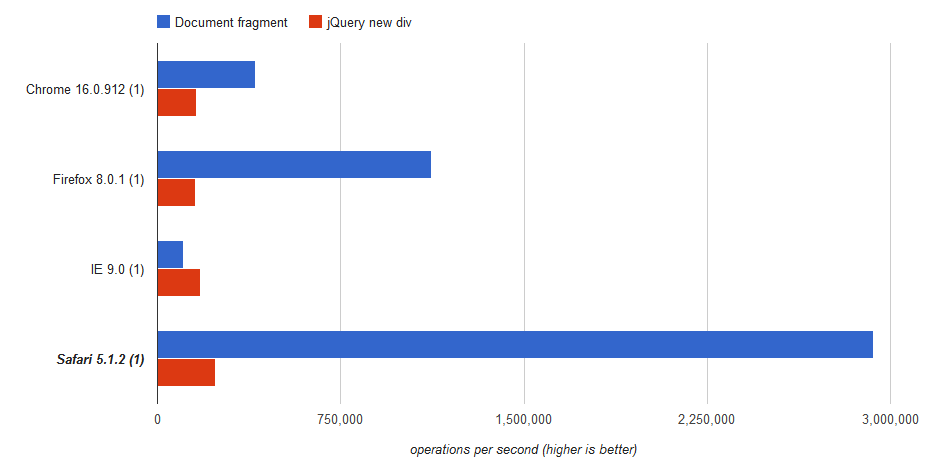
I assumed creating a div with jQuery takes more time compared to native document fragment creation. Surprise, I was wrong. I’ve created a test page on JSPerf at http://jsperf.com/jquery-vs-documentfragment. Simply put, the speed depends on the browser.
Verdict: Use document fragment in all browsers except Internet Explorer. In general, use document fragment:
document.createDocumentFragment();In case you are using Less CSS to generate CSS markups, IIS won’t find your .less files by default. You will get a 404 Not Found error. The problem is the missing MIME type.
The solution is simple, just register the MIME type for .less in web.config:
<system.webServer>
  <staticContent>
    <mimeMap fileExtension=".less" mimeType="text/css"/>
  </staticContent>
</system.webServer>
public interface IController
{
    void Execute(RequestContext requestContext);
}
ControllerBase abstract class implements the IController interface:public abstract class ControllerBase : MarshalByRefObject, IController
{
private TempDataDictionary _tempDataDictionary;
private bool _validateRequest = true;
private IDictionary<string, ValueProviderResult> _valueProvider;
private ViewDataDictionary _viewDataDictionary;
public ControllerContext ControllerContext {
get;
set;
}
public TempDataDictionary TempData {
get {
if (_tempDataDictionary == null) {
_tempDataDictionary = new TempDataDictionary();
}
return _tempDataDictionary;
}
set {
_tempDataDictionary = value;
}
}
public bool ValidateRequest {
get {
return _validateRequest;
}
set {
_validateRequest = value;
}
}
public IDictionary<string, ValueProviderResult> ValueProvider {
get {
if (_valueProvider == null) {
_valueProvider = new ValueProviderDictionary(ControllerContext);
}
return _valueProvider;
}
set {
_valueProvider = value;
}
}
public ViewDataDictionary ViewData {
get {
if (_viewDataDictionary == null) {
_viewDataDictionary = new ViewDataDictionary();
}
return _viewDataDictionary;
}
set {
_viewDataDictionary = value;
}
}
protected virtual void Execute(RequestContext requestContext) {
if (requestContext == null) {
throw new ArgumentNullException("requestContext");
}
Initialize(requestContext);
ExecuteCore();
}
protected abstract void ExecuteCore();
protected virtual void Initialize(RequestContext requestContext) {
ControllerContext = new ControllerContext(requestContext, this);
}
[...]
}
public class MvcHandler : IHttpHandler, IRequiresSessionState
{
    [...]
    protected internal virtual void ProcessRequest(HttpContextBase httpContext)
    {
        AddVersionHeader(httpContext);

        // Get the controller type
        string controllerName = RequestContext.RouteData.GetRequiredString("controller");

        // Instantiate the controller and call Execute
        IControllerFactory factory = ControllerBuilder.GetControllerFactory();
        IController controller = factory.CreateController(RequestContext, controllerName);
        if (controller == null) {
            throw new InvalidOperationException(
                String.Format(
                    CultureInfo.CurrentUICulture,
                    MvcResources.ControllerBuilder_FactoryReturnedNull,
                    factory.GetType(),
                    controllerName));
        }
        try {
            controller.Execute(RequestContext);
        }
        finally {
            factory.ReleaseController(controller);
        }
    }
    [...]
}
Firstly it reads the controller name from the routing data and after that it creates a controller by the name read before. Finally it calls the Execute method of the controller to run the controller’s code.